
How to View Reddit User and Post History
Learn how to find a Reddit user’s public posts and comments, filter the results, and understand why a user history list is not a complete account archive.
Reddit user history is the list of public posts and comments published under one username. You can view it by searching the username, choosing posts or comments, then filtering by subreddit, date, or keyword. The list is not guaranteed to be complete.
If you are trying to find an older Reddit post, starting from the account that published it can be faster than searching the whole site. This guide explains what a user history search can show, how to use one, and why the results should not be treated as a complete archive of an account.
What is Reddit user history?
Reddit user history is a list of public posts and comments associated with a username. Depending on the search tool and what Reddit currently makes available, you may be able to review:
- Posts submitted by the account
- Comments written by the account
- The subreddit where each item appeared
- The title, text, and date returned for each item
- A link back to the original Reddit page
This is different from your personal browsing history. It does not show every post you have opened, your saved items, private messages, chats, or hidden content.
How to view a Reddit user’s public history
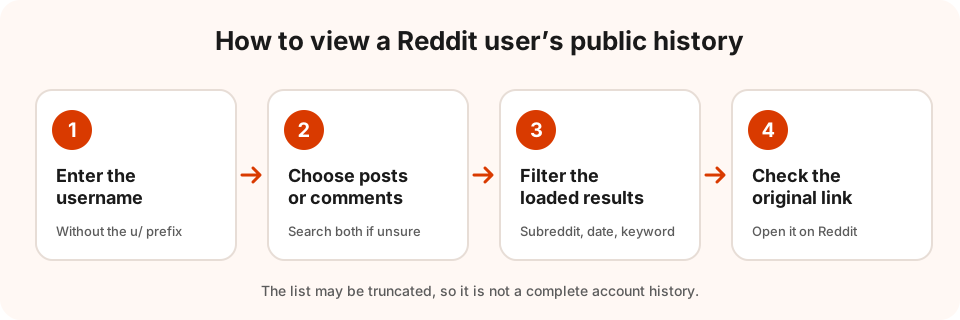
1. Start with the username
Use the account’s username without the u/ prefix, or enter a profile URL if the search form accepts one. Check the spelling carefully. A deleted, renamed, suspended, or misspelled account may return no usable results even when you remember seeing the account before.
You can use the Reddit Archive search tool to browse publicly available posts or recent comments for a username. Choose the u/ search mode, enter the username, and submit the search.
2. Choose posts or comments
Posts and comments answer different questions:
- Choose posts when you are looking for something the user published, such as a question, guide, image post, or discussion starter.
- Choose comments when you remember the user replying inside someone else’s thread.
If you are not sure which one contains the information, search both. A comment may be easier to find through the post where it was written, while a self-post may contain the full text in the account’s post list.
3. Narrow the loaded results
Once results are available, use the available subreddit, date, or keyword filters to reduce the list. Filters are most useful when you already know one detail, such as:
- The subreddit where the discussion took place
- An approximate month or year
- A distinctive word from the title or body
- Whether the item was a post or a comment
Filtering can make a long history easier to read, but it does not create a new copy of Reddit’s entire account history. In this tool, filters apply to the results that have already been loaded.
Why can’t I see the full account history?
A user history result is not guaranteed to be complete. Several things can limit what you see:
- Reddit may not currently return every older item.
- A list may be truncated or paginated.
- The author may have deleted a post or comment.
- A moderator may have removed the content from a community.
- The account or subreddit may no longer be available to you.
- The search service may have coverage or request limits.
For that reason, an empty result does not prove that the user never posted something. It only means that the requested item was not returned in that search.
Reddit user history vs. Reddit archive
These terms are related, but they describe different tasks:
- User history: Public posts and comments associated with a username.
- Reddit archive search: Public Reddit content found by a keyword, link, username, or subreddit.
- Archived Reddit post: A Reddit post whose community setting limits new votes and comments.
- Deleted or removed content: Content that may no longer be publicly available on Reddit.
An archived post is not automatically deleted. Reddit can leave an archived post visible while preventing new votes and comments. See why Reddit posts get archived for the difference between an archived post, deleted content, and a separate archive copy.
Can a user history search recover deleted posts?
No. A user history search does not guarantee recovery of deleted or removed text. It may return information that is still publicly available, such as a title, link, or placeholder, but that is not the same as recovering a deleted copy.
If you have the original post or comment URL, searching the link can be a useful second step. It checks that specific item instead of relying only on the username list. The result still depends on what is currently available, and paying for more searches does not unlock deleted text. For what the [deleted] and [removed] labels mean, see can you see deleted Reddit posts and comments.
A practical search checklist
When looking for one old Reddit item, try this order:
- Search the username’s public posts.
- Search the username’s comments.
- Filter by the likely subreddit.
- Try a distinctive keyword from the title or text.
- If you have it, search the original Reddit or
redd.itlink. - Compare the returned date and subreddit with what you remember.
Keep the original Reddit link with any notes you make. A result can change later if the content is edited, removed, or no longer returned by Reddit.
What Reddit Archive can and cannot show
Reddit Archive helps you search publicly available Reddit posts and comments by keyword, link, username, or subreddit. Each result links back to Reddit and shows the content and retrieval details that were actually returned.
It is not a complete historical archive. It does not access private or banned communities, retrieve private messages or chats, or promise recovery of deleted and removed text.
Search a Reddit user’s public history and start with a username, or read the explanation of Reddit archived posts if you are unsure what “archived” means.